What are the typical work processes?
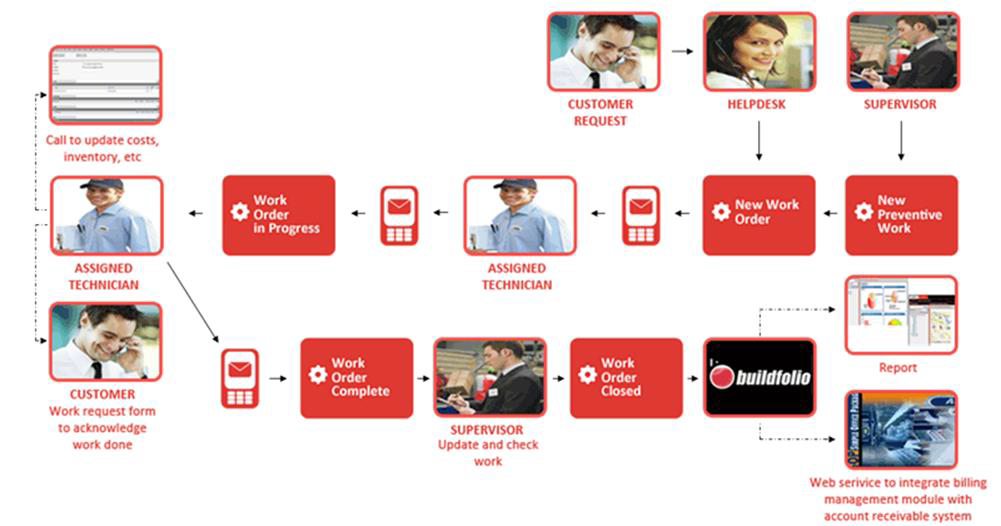
In Work Order Management module, the work flow for corrective maintenance typically begins when a fault occurs and a caller/tenant submits a new work request by calling the HelpDesk or if they have a login account to submit it directly to the system.
Once the Work Request is submitted, the HelpDesk personnel may then fill in the required information, such as the Work Type, Problem Code, Asset involved, and assign a designated supervisor to each work request. This turns the Work Request into a corrective maintenance Work Order.
Said supervisor will then receive an SMS or notification from the BUILDFOLIO II mobile app, notifying them that a work order (with the Work Order Number) has been assigned to them. The supervisor will then log in to Buildfolio to assign a Technician, who may be from a designated 3rd party vendor who has a contractual obligation. For each Work Order, Buildfolio automatically filters Technicians that can be assigned to it based on the Technician’s craft that matches the Type of Services they are assigned to. The assigned Technician will then receive an SMS or BUILDFOLIO II notification upon which the Technician can send an SMS in reply, or click the ACK button on BUILDFOLIO II to acknowledge the work.
As the Technician progresses through the Work Order, they can utilise BUILDFOLIO II mobile app to Acknowledge the work, and record their Arrival and Completion Time on the go.
The costs that are incurred in a Work Order can also be updated during the course of processing it. Options are provided to bill the cost to the landlord, or caller or tenant. The work order form and details of the work order are accessible to users with the appropriate access rights throughout the lifecycle of the work order.
When the Work Order is completed and all necessary information are in order (e.g. costs incurred), the Supervisor can then submit the Work Order to the Work Manager for closure. The latter will then verify and close the work order, allowing the system to bill the costs incurred to the selected party. The work order may be included in the relevant reports that can be generated, and is retrievable from the system at all times.
- For step-by-step guides to creating Work Requests and Work Orders, see Create Work Requests and Work Orders.
- For more step-by-step guides to using Work Order Management module, see Work Order Management Module.