How to cancel a Work Order?
Jump to
How to cancel a Work Order on web browser?
Note: Only the Supervisor and Work Manager will have access rights to cancel Work Orders on Buildfolio.
To cancel a Work Order on web browser
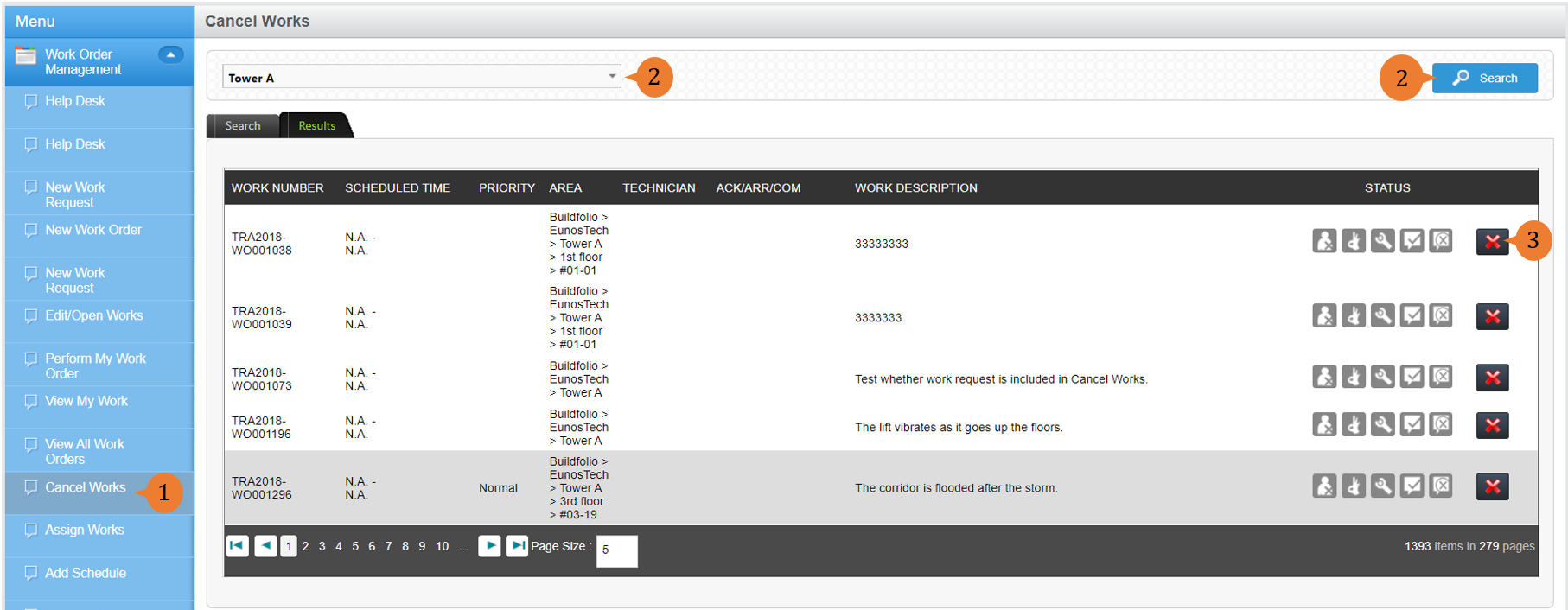
- Select Cancel Works under Work Order Management module from the menu.
- Select the Location concerned from the location tree and perform a Search. A list of Work Orders for that location will appear.
- To cancel a Work Order, select the Cancel icon
 .
.
- A dialogue box will appear to prompt you to confirm your cancellation. To cancel the Work Order, select OK.

When the Work Order is cancelled, a success message will appear below the page title.

More on this topic
- For a step-by-step guide to viewing your cancelled Work Orders in web browser, see How to view all Work Orders (including cancelled and closed ones).
- For more step-by-step guides to using Work Order Management module, see Work Order Management Module.