How to Submit a Work Order for Closure?
Jump to
How to Submit a Work Order for Closure on web browser?
Note: This is usually performed by the Work Supervisor role or anyone given access to. It is advisable that the Work Supervisor ensure that the Work Order contains all the information from work done, cost details, and so on.
To submit a completed Work Order for closure on web browser
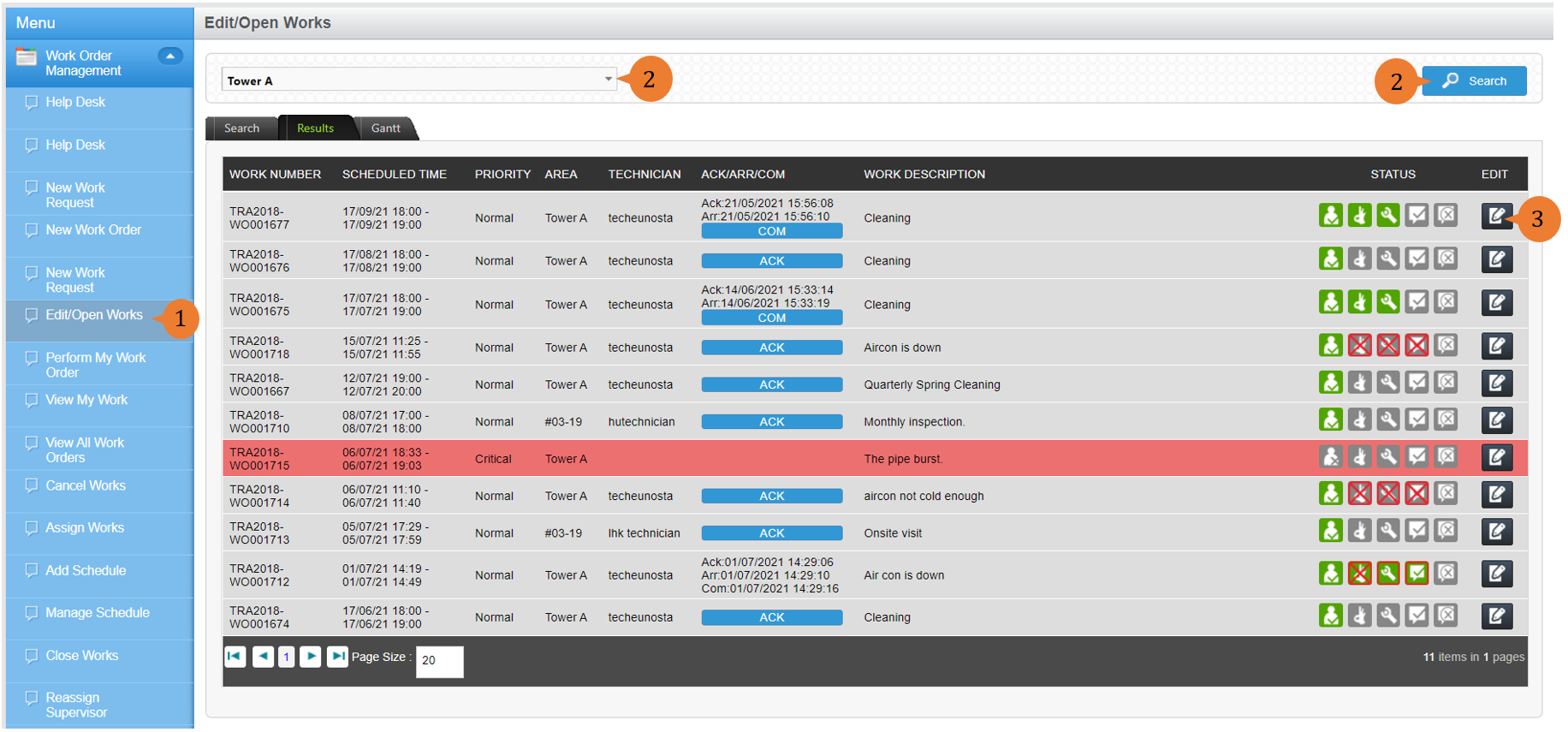
- Select Edit/Open Works under Work Order Management module from the menu.
- Select the Location of concern from the location tree and run a Search. A list of open Work Orders for that location will appear.
- For the Work Order you wish to Submit for Closure, select the EDIT icon
 .
.
- (optional)Edit and update the details of the Work Order. To save the changes made, select Save.
- To submit the Work Order for Closure, select Submit.

- A dialogue box will appear to prompt you to confirm your submission. To submit the Work Order, select OK.

More on this topic
- For a step-by-step guide to submitting a Work Order for Closure on BUILDFOLIO II mobile app, see How to Submit a Work Order for Closure on BUILDFOLIO II mobile app.
- For a step-by-step guide to Closing a completed Work Order, see How to Close a Work Order.
- For more step-by-step guides to using Work Order Management module, see Work Order Management Module.