Generating Labour Utilization Report
How to generate a labour utilization report?
Labour Utilization Report will show the list of work requests/work orders that require manpower to perform the task. It will contain information on the work request/work order together with the appointed labour to perform the task.
To generate a labour utilization report
- Select Labour Utilization under Report from the Menu.
- Select the location that you wish to search for.
- Click on the Search button.
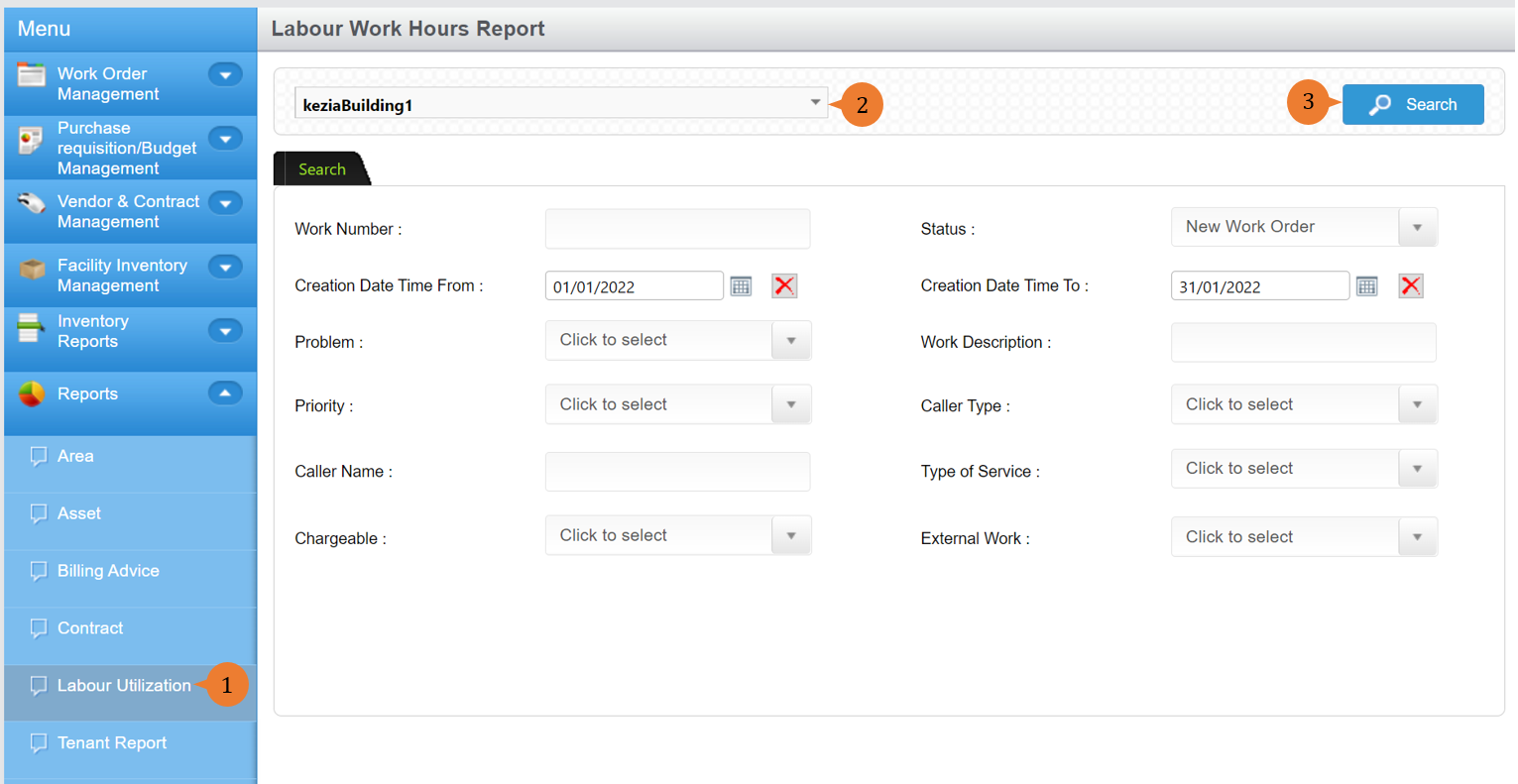
- A new tab will appear that contains the contract report based on the search criteria.
- The report will entail the following:
- Work Number
- Create Date/Time
- Status
- Area
- Asset ID
- Type of Service
- Problem Code
- Work Type
- Supervisor
- External
- Vendor Name
- Checklist
- Diagnosis
- Remedy
- Work Description
- Manager
- Technician
- Craft
- Hourly Rate
- Hours
- ActualQty Cost
- Cost

More on this topic 
- For step-by-step guides to using the Reports module, see Reports Module.