How to view all Work Orders (including cancelled and closed ones)?
Jump to
How to view all Work Orders (including cancelled and closed ones) on web browser?
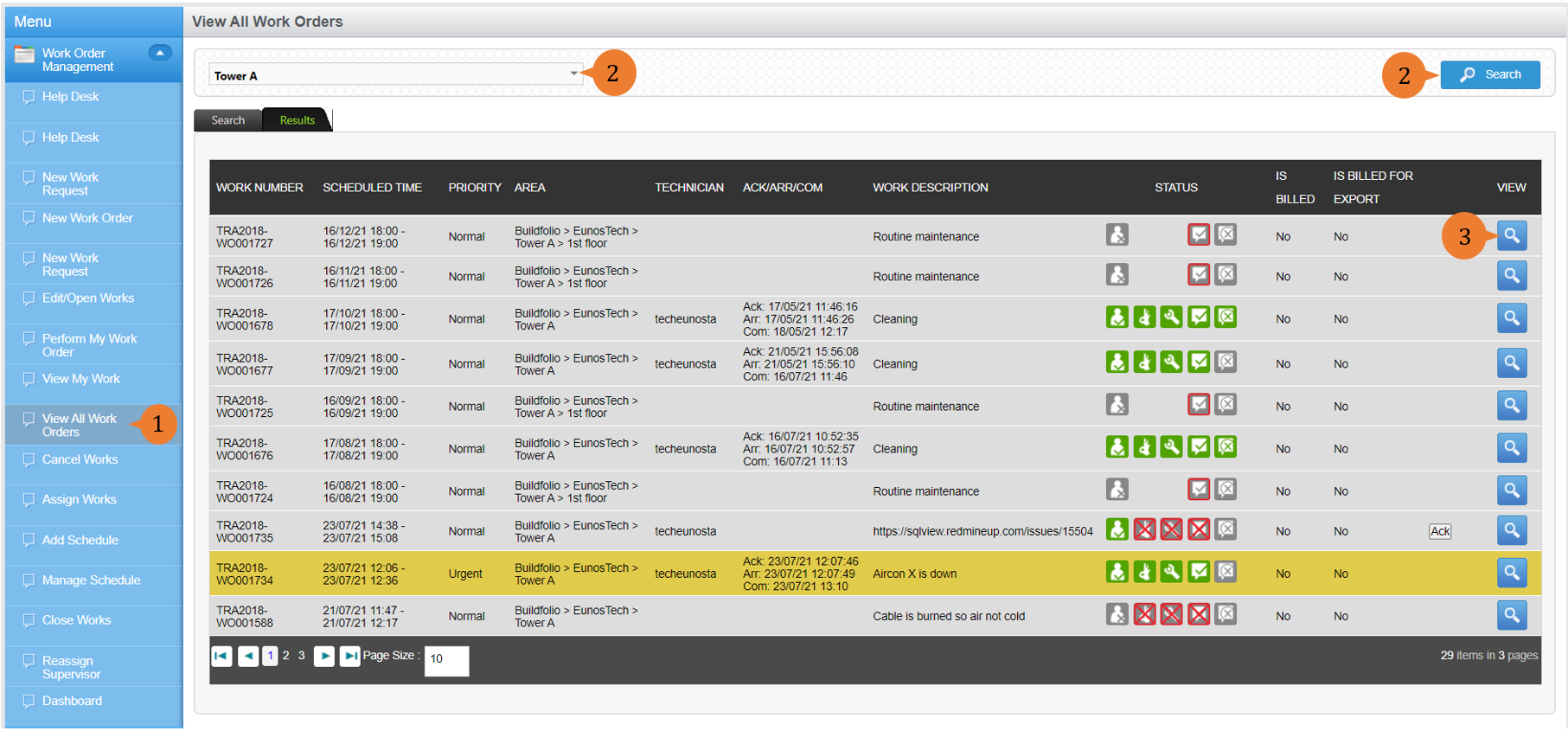
To view all open, closed, and cancelled Work Orders
- Select View All Work Orders under Work Order Management module from the menu.
- Select the Location concerned and perform a Search. This will display all open, closed, and cancelled work orders.
- To view the details of a Work Order, select the VIEW icon
 .
.
More on this topic
- For a step-by-step guide to viewing all Work Requests/Work Orders raised by me on web, see How to view Work Requests/Orders raised by me?
- For a step-by-step guide to viewing Work Orders on BUILDFOLIO II mobile app, see How to view and filter Work Orders on BUILDFOLIO II mobile app?
- For a step-by-step guide to updating a Work Order, see How to update a Work Order.
- For more step-by-step guides to using Work Order Management module, see Work Order Management Module.